




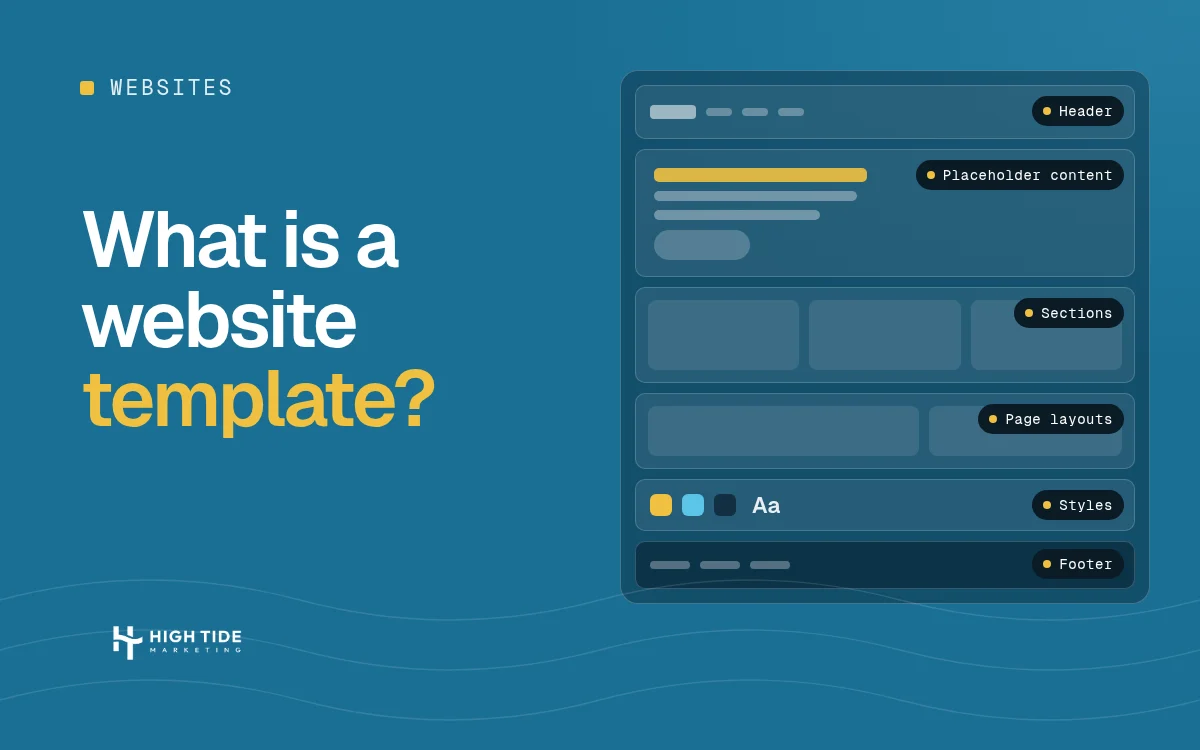
A website template is a pre-built design for a site or a page (layout, sections, fonts and colors) that you fill with your own text, photos and branding instead of designing from scratch. Website builders like Wix and Squarespace, WordPress themes and HTML templates all work this way. A template gets you live faster, but other sites can share the same design, and changing it beyond its settings usually takes code.
If “template” keeps coming up when you talk to builders and agencies, here’s what it means, how it works on the big platforms, and how to tell whether one is enough for your business. I checked every platform fact below on the platforms’ own help pages on November 20, 2026.
What is a website template?
Picture a finished website with fake content in it. You keep the structure and swap in your own words and photos. Squarespace puts it this way: a template is a designed starting point for your site’s layout, colors, and fonts, and you can keep the structure and replace the demo content with your own (page updated November 6, 2026).
Wix says its templates come with sample content, color themes, galleries, inner pages and built-in business features. Wix lists 2000+ of them, and says they’re free to use (page updated October 20, 2026).
In practice a template gives you:
- A header and footer (logo, menu, contact details) that repeat on every page.
- Page layouts for the pages most businesses need: home, services, about, contact.
- Sections like a hero banner, testimonials or a gallery that you can add, remove and reorder.
- Styles: the colors, fonts and spacing, set once and applied everywhere.
- Placeholder text and images that you replace.
A “template website” just means a site built on one of these.
How does a website template work?
On a builder, it goes like this:
- Pick a template.
- Replace the placeholder content.
- Adjust what the platform lets you adjust: colors, fonts, section order, menus.
- Publish.
The part people miss is step 3. You can change what the platform lets you change. Squarespace explains that it builds style rules into each template, and those rules keep elements from conflicting with each other and keep your site compatible with modern browsers and mobile devices, which is why style tweaks have set options.
You can go further with code. Squarespace’s help page says that custom code might break your site’s appearance or behavior, especially on mobile devices, and that its support team can’t help you troubleshoot it. So if you want something the settings don’t offer, you’re either hiring a developer or accepting the risk.
What is the difference between a site template and a page template?
This is the question people actually search, so here’s a straight answer.
- A site template sets the design for the whole website: header, footer, fonts, colors and the default look of every page.
- A page template is a layout for one page or a group of pages, like a full-width landing page or a page with a sidebar.
One caveat: “site template” is my plain-English label, not an official term. The platforms use their own words. WordPress’s developer documentation says page templates are a specific type of template file that can be applied to a specific page or groups of pages (last modified July 22, 2026), and lists examples such as a full-width one-column layout and a two-column layout with a sidebar.
WordPress also documents reuse. In modern block themes, the header and footer are template parts: you build them once and include them in any template, which is why a header change shows up on every page.
Website template vs theme: what is the difference?
On WordPress, a theme is the whole package. WordPress.org defines it as a collection of files that work together to produce a graphical interface with an underlying unifying design for a website, and these files are called template files (last modified August 7, 2026). So a theme contains many templates, and you switch themes from the Appearance menu.
On Wix and Squarespace, “template” means the whole starting design, and each has a different rule about changing it later:
- Wix: once you select a template and start editing it, you cannot change it. You can create a new site with a different template and transfer your Premium plan and domain to it.
- Squarespace 7.1: the template is just the design you start from. Squarespace says every 7.1 site has the same features and style options, so you don’t switch templates to get a feature.
- Squarespace 7.0: you can preview and switch templates at any time without losing your content.
If you’re comparing platforms, that difference matters more than the template library size.
What are the main types of website templates?
- Builder templates (Wix, Squarespace and similar). You edit them inside the builder. Wix says you cannot download or export its templates, its sites must be hosted on Wix’s servers, and it doesn’t support importing templates from outside Wix. Squarespace says its designs aren’t available for other platforms.
- WordPress themes. You install one on a WordPress site you host. The official Theme Directory is where WordPress.org says every theme is reviewed by a dedicated team. Paid themes sold elsewhere don’t go through that directory, so I’d check the seller’s update history and support before buying.
- HTML and CSS templates. Static files you edit in code. You get the most control and need the most technical skill.
- Blank or wireframe templates. Wix, for one, offers blank templates, including ones with a guiding layout already in place. These are closer to starting from scratch, with a little structure.
Store templates exist on most platforms too. We don’t build e-commerce sites, so check the platform’s own store features if you sell products online.
Are website templates good for SEO?
A template doesn’t rank by itself. Your content, how fast the pages load, and how your site is organized do the work. What a template can do is help or hurt on speed, mobile layout and page structure, so test the demo before you commit.
Mobile is the easy one to check. Wix says its templates are automatically optimized for mobile viewing, which means the layout and placement of elements may be different on a phone. Open the template’s demo on your own phone and look at the part your customers use most, whether that’s your phone number, your booking button or your service list.
For the details, see SEO-friendly website design.
What are the pros and cons of using a website template?
The honest pros:
- You’re live sooner. You’re editing a finished layout, not waiting on a design.
- You can edit it yourself. Swapping text and photos doesn’t need a developer.
- Wix templates are free to use. Wix says so on its templates page, though you still pay for a plan to connect a domain or use premium features.
The honest cons:
- Your design isn’t yours alone. Wix says it’s not possible to buy a template and make it unavailable for others. Expect other sites to look similar, so your logo, photos and writing carry the brand.
- You’re limited to what the platform allows. Anything outside the settings means code or a developer.
- Moving is a rebuild on a builder. Wix says its websites cannot be transferred to other platforms and have to be recreated manually. Plan for that before you invest in a lot of content.
When is a template enough, and when do you need a custom website?
My rule of thumb: a template is enough when your site is a handful of pages, you don’t need anything unusual, and you’d rather be live soon than perfect. That’s an opinion, not a statistic. It stops being enough when you need a layout or a tool the platform doesn’t offer, or when your site has to do real work for lead generation and you keep hitting the settings wall.
A quick check before you pick one:
- Can you export your site or move it later?
- Who hosts it?
- What does the platform let you change without code?
- Who do you call when something breaks?
The full comparison is in custom website vs template, and website builder vs custom website covers the platforms. If you’re not sure what you already have, here’s how to tell if a website is custom built. For what a custom build costs, see custom website cost, and if you decide to move off a template, read how long a website redesign takes first.
Frequently asked questions
Are free website templates safe to use?
It depends on where you get them. WordPress.org says every theme in its official directory is reviewed by a dedicated team. I don’t have a source for the risk level of free templates from random download sites, so my advice is opinion: stick to the official directory or a known seller, and check when it was last updated.
Can you change a website template later?
It depends on the platform. On Wix, no: you’d create a new site with a different template. On Squarespace 7.0 you can switch, and on 7.1 you don’t need to, because every site has the same features. On WordPress you can switch themes from the Appearance menu.
Do website templates work on mobile devices?
Wix and Squarespace both say their templates are built for it. Wix says its templates are automatically optimized for mobile, and Squarespace says its style rules keep sites compatible with mobile devices. Your own content can still look off on a phone, so check the live preview.
Can you move a template site to another platform?
Not from Wix. Wix says its sites can’t be transferred and have to be recreated manually. Squarespace says its designs aren’t available for other platforms.
Is a WordPress theme the same as a template?
No. A theme is the full package of files. A template is one layout file inside it.
Is a website template good enough for a small business?
For a simple site, often yes. If you need something the template can’t do, or you want a design nobody else has, that’s when to look at custom.
Not sure which one you need?
If you want a second opinion on whether a template will hold up for your business, book a discovery call or see how we build websites. We work with dozens of clients across different industries. We’ll look at what you have and what it needs to do, and pricing gets covered on the call.
Sources
All facts in this article come from the sources below. I checked each page on November 20, 2026.
- Wix Help Center, “About Templates”, updated October 20, 2026.
- Squarespace Help Center, “How site templates work in versions 7.0 and 7.1”, updated November 6, 2026.
- WordPress.org, “Work with themes”, last updated August 7, 2026.
- WordPress Developer Resources, “Page Templates”, last updated July 22, 2026.
- WordPress Developer Resources, “Introduction to Templates”, last updated December 14, 2023.